Clothing Pack v5 Mal
115.00 EUR
✦ Want your server to stand out? You’re in the right place. Discover the best custom clothing, packs, and peds for FiveM and GTA. Tebex Gold Seller, with years of experience delivering high-quality content ✦

Este tutorial tiene una duración aproximada de 45 minutos en español y está dirigido a personas que ya tengan experiencia previa creando ropa y ped’s, así como un conocimiento mínimo de Blender, manejo de normales, specular y texturas.
Durante el tutorial partiremos de un modelo base (en mi caso, una capa que está incluida). A partir de este modelo:
Crearemos un duplicado optimizado (low) para poder exportarlo correctamente a ZModeler.
Prepararemos el modelo pensando desde el inicio en la orientación y comportamiento de las físicas.
⚠️ Importante:
ZModeler es un software de pago y es la herramienta que utilizaremos.
No proporciono ZModeler, cada alumno debe disponer de su propia licencia.
Una vez tengamos el modelo base y el low preparados, pasaremos a ZModeler, donde:
Ajustaremos nombres de texturas y valores
Explicaré qué opciones deben activarse y dónde
Añadiremos las colisiones necesarias para la ropa con físicas
El contenido se divide en:
45 minutos repartidos en varios vídeos
Un extra de 24 minutos, donde creo otro modelo distinto desde cero, mostrando:
Cambios reales
Pruebas
Testeo de colisiones
Ajustes de movimiento para que se entienda bien el proceso
Este curso refleja mis conocimientos y mi forma personal de trabajar la ropa con físicas.
Está totalmente prohibido compartir los vídeos. Ten en cuenta que aquí comparto mi experiencia, mi voz y mi trabajo.
CodeWalker (gratis)
ZModeler (de pago)
Blender (gratis)
Durty Cloth o grzyClothTool
Un servidor para testear el contenido
Bienvenida
Explicación de limitaciones
Preparación del modelo base, optimización y creación del low
Exportación y preparación para importar en CodeWalker
Primeros pasos en las físicas de la ropa
Error común al añadir opciones (y cómo solucionarlo)
Explicación de colisiones y huesos
Creación de colisiones
Modelo final y conclusiones
Los vídeos estarán subidos a YouTube, por lo que podréis activar los subtítulos en vuestro idioma si no entendéis el contenido en español.
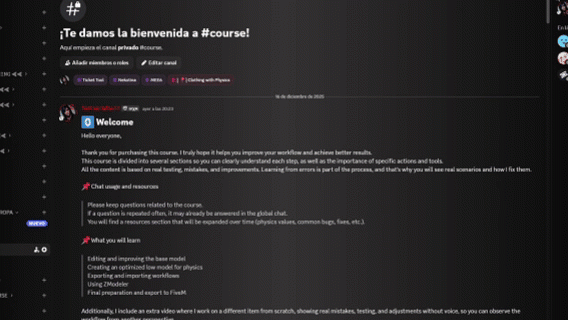
Al comprar el producto, descargarás un acceso a mi Discord, donde se encuentra toda la información necesaria y el curso completo.
This tutorial has an approximate duration of 45 minutes in Spanish and is intended for users who already have previous experience creating clothing and ped’s, as well as basic knowledge of Blender, including normals, specular maps, and textures.
Throughout the tutorial, we will start from a base model (in my case, a cape which is included). From there:
We will create an optimized duplicate (low model) in order to export it properly to ZModeler
We will prepare the model while already considering the orientation and behavior of the cloth physics
⚠️ Important:
ZModeler is a paid software and is the tool we will be using.
I do not provide ZModeler — each user must have their own license.
Once the base model and low version are ready, we will move to ZModeler, where I will:
Adjust texture names and values
Explain which options should be enabled and where
Add the necessary collisions for cloth physics
The content is divided into:
45 minutes split into several videos
An extra 24-minute video, where I create a different model from scratch, showing:
Real changes
Testing
Collision behavior
Movement adjustments so the process is clearly understood
This course represents my personal knowledge and workflow for creating clothing with physics.
Sharing the videos is strictly prohibited. Please keep in mind that I am sharing my experience, my voice, and my work.
CodeWalker (free)
ZModeler (paid)
Blender (free)
Durty Cloth or grzyClothTool
A server to test the content
Welcome
Explanation of limitations
Base model preparation, optimization, and low creation
Exporting and preparing models for CodeWalker
First steps in cloth physics
Common mistake when adding options (and how to fix it)
Explanation of collisions and bones
Creating collisions
Finished model and conclusions
The videos will be uploaded to YouTube, so you will be able to enable subtitles in your own language if you do not understand Spanish.
After purchasing the product, you will download access to my Discord, where all the necessary information and the full course are available.